Kotlin Inheritance

Inheritance is a core part of Object Orientated programming that provides a powerful code reuse tool by grouping properties and behaviors into common classes (called base classes) and having unique properties and behaviors placed in specific classes that grow out from the base class (called child classes). The child class receives all properties and behavior from its parent class, but it also contains properties and behaviors that are unique to itself. Inheritance allows for specialization of software components when a component has a specific need, but also allows for generalization when using items common to the parent.

Let’s consider an example that is more specific. Suppose we have a Vehicle class that models some sort of vehicle that we can drive. We start by creating a class.

open class Vehicle(
        private val make : String,
        private val model : String,
        private val year : Int) {

    fun start() = println("Starting up the motor")

    fun stop() = println("Turning off the engine")

    fun park() = println("Parking " + toString())

    open fun drive() = println("Driving " + toString())

    open fun reverse() = println("Reversing " + toString())

    override fun toString(): String {
        return "${year} ${make} ${model}"
    }
}

We know that all Vehicles have a make, model, and year. Users of a Vehicle can start and turn off the motor. They can also park, drive, or put the Vehicle in reverse. So far so good. However, later on, we need a vehicle that can tow a camper.

We could add a tow() method to Vehicle, but would that really make sense? What if our Vehicle is a Fiat? Would we really tow a camper with a Fiat? What we need is a Truck. Thanks to Inheritance, we don’t need to write Truck from scratch. We can simply create a specialized version of a Vehicle instead.

open class Truck(make: String,
            model: String,
            year: Int,
            private val towCapacity : Int) : Vehicle(make, model, year) {
    fun tow () = println("${toString()} is towing ${this.towCapacity} lbs")
}

This code creates a Truck class based off of Vehicle. As such, the Truck still has a make, model, and year. It can also start(), stop(), drive(), park(), and reverse() just like any other vehicle. However, it can also tow things and has a towCapacity property. What we have essentially done is reused all of the code from Vehicle and just changed what was needed so that we have a new Vehicle like object that also tows things.

Of course, later on, our needs change again and we decide to go camping in the mountains. It may snow in the mountains, so in addition to being able to tow things, we may want four wheel drive. Once again, not all Trucks have four wheel drive, so we don’t want to add a four wheel drive into Truck. As a matter of fact, four wheel drive isn’t even a specific behavior. What it really does is it enhances the already existing behaviors drive and reverse.

Let’s create another child class, based off of Truck, and specialize the driving behavior.

class FourWheelDrive(make: String, model: String, year: Int, towCapacity: Int) :
        Truck(make, model, year, towCapacity) {

    var fourByFour = false

    override fun drive() {
        if(fourByFour){
            println("Driving ${toString()} in four wheel drive")
        } else {
            super.drive()
        }
    }

    override fun reverse() {
        if(fourByFour){
            println("Reversing ${toString()} in four wheel drive")
        } else {
            super.drive()
        }
    }
}

In this class, we are modifing the already existant behaviors of driving and going in reverse. If the truck has four wheel drived turned on, the output of the program reflects this fact. One the other hand, if four wheel drive is turned off, the methods call super.drive(), which means use the behavior defined in Truck (which bubbles up to the original behavior in Vehicle). Thus, FourWheelDrive has specialized behaviors that were originally found in Vehicle. This is known as overriding behaviors.

Now let’s do a demonstration

fun main(args : Array<String>){
    val car = Vehicle("Fiat", "500", 2012)
    val truck = Truck("Chevy", "Silverado", 2017, 8000)
    val fourWheelDrive = FourWheelDrive("Dodge", "Ram", 2017, 8000)

    //drive() comes from Vehicle
    car.drive()
    println()

    //There is no drive() in Truck, but it 
    //inherited the behavior from Vehicle
    truck.drive()
    println()

    //FourWheelDrive override drive() to customize it
    fourWheelDrive.drive()
    println()

    println("Turn on four wheel drive")
    fourWheelDrive.fourByFour = true
    fourWheelDrive.drive()
}

Output

Driving 2012 Fiat 500

Driving 2017 Chevy Silverado

Driving 2017 Dodge Ram

Turn on four wheel drive
Driving 2017 Dodge Ram in four wheel drive

Three vehicles are made at the beginning of main: car, truck, and fourWheelDrive. They are all of type Vehicle, but Truck is a specialized case of Vehicle and fourWheelDrive is a specialized case of Truck. As such, all three objects have a drive() method which we use in the example program. When fourWheelDrive turns on fourByFour and then invokes drive, the console prints out that it is driving in four wheel drive.

Sealed Class

Although Kotlin supports inheritance, it’s use is discouraged. In order to use inheritance in Kotlin, the ‘open’ keyword needs to be added in front of the ‘class’ keyword first. If the ‘open’ keyword is ommitted, the class is considered to be final and the compiler will not allow the class to be used as a parent class. Likewise, all functions in a class also have to be marked as ‘open’ (see drive and reverse in vehicle), otherwise, overriding behaviors is not permitted.

Why would Kotlin choose to do this while other languages encourage inheritence? After studying issues found with inheritance, it became clear that many developers wrote classes without considering that a class may be extended later on. When changes where made in the parent class, the child classes could potentially break as well. This ended up creating a situation called “fragile base classes”.

Kotlin designers decided that by making developers mark classes as open, it would encourage developers to think about the needs of child classes when working on a base class. Kotlin also has powerful delegation mechanisms that encourage developers to use composition and delegation as code reuse mechanisms rather than inheritance.

Example program

Here is the entire source code used in this post

//Has to be marked as open to allow inheritance
open class Vehicle(
        private val make : String,
        private val model : String,
        private val year : Int) {

    fun start() = println("Starting up the motor")

    fun stop() = println("Turning off the engine")

    fun park() = println("Parking " + toString())

    //Has to be marked as open to allow overriding
    open fun drive() = println("Driving " + toString())

    //Has to be marked as open to allow overriding
    open fun reverse() = println("Reversing " + toString())

    override fun toString(): String {
        return "${year} ${make} ${model}"
    }
}

//Has to be marked as open for inheritance
open class Truck(make: String,
            model: String,
            year: Int,
            private val towCapacity : Int) : Vehicle(make, model, year) {
    fun tow () = println("${toString()} is towing ${this.towCapacity} lbs")
}

//This class is not open and therefore cannot be inherited from
class FourWheelDrive(make: String, model: String, year: Int, towCapacity: Int) :
        Truck(make, model, year, towCapacity) {

    var fourByFour = false

    //The override keyword signals to the compiler that we are overriding
    //the drive() method
    override fun drive() {
        if(fourByFour){
            println("Driving ${toString()} in four wheel drive")
        } else {
            super.drive()
        }
    }

    //The override keyword signals to the compiler that we are overriding
    //the reverse() method
    override fun reverse() {
        if(fourByFour){
            println("Reversing ${toString()} in four wheel drive")
        } else {
            super.drive()
        }
    }
}

fun main(args : Array<String>){
    val car = Vehicle("Fiat", "500", 2012)
    val truck = Truck("Chevy", "Silverado", 2017, 8000)
    val fourWheelDrive = FourWheelDrive("Dodge", "Ram", 2017, 8000)

    //drive() comes from Vehicle
    car.drive()
    println()

    //There is no drive() in Truck, but it
    //inherited the behavior from Vehicle
    truck.drive()
    println()

    //FourWheelDrive override drive() to customize it
    fourWheelDrive.drive()
    println()

    println("Turn on four wheel drive")
    fourWheelDrive.fourByFour = true
    fourWheelDrive.drive()
}

Kotlin Encapsulation and Procedural Programming

Software developers use the term Encapsulation to refer to grouping related data and behavior into a single unit, usually called a class. The class can be seen as the polar opposite of procedural based programming where data and behavior are treated as two distinct concerns. It should be noted that OOP and procedural programming have their distinct advantages and one should not be thought of as better as the other. Kotlin supports both styles of programming and it’s not uncommon to see a mix of both procedural and OOP programming.

Procedural Programming Example

Let’s with an example of procedural programming. In this example, we are working with a rectangle object. Its data is stored in a map (a data structure that supports key-value pairs) and then we have functions that consume the data.

val rectangle = mutableMapOf("Width" to 10, "Height" to 10, "Color" to "Red")

fun calcArea(shape : Map<String, Any>) : Int {
    return shape["Height"] as Int * shape["Width"] as Int
}

fun toString(shape : Map<String, Any>) : String {
    return "Width = ${shape["Width"]}, Height = ${shape["Height"]}, Color = ${shape["Color"]}, Area = ${calcArea(shape)}"
}

So we begin with the rectangle object that holds some properties of our rectangle: width, height, and color. Two functions follow the creation of the rectangle. They are calcArea and toString. Notice that these are global functions that accept any Map. This is dangerous because we can’t guarantee that the map will have “Width”, “Height”, or “Color” keys. Another issue is our loss of type safety. Since we need to store both Integers and Strings in the rectangle map, our value has to be of type Any, which is the base type in Kotlin.

OOP

Here is the same problem solved with an OOP approach.

class Rectangle(
    var width : Int,
    var height : Int,
    var color : String){

    fun calcArea() = this.width * this.height

    override fun toString() =
            "Width = ${this.width}, Height = ${this.height}, Color = ${this.color}, Area = ${calcArea()}"
}

The OOP solution demonstrates encapsulation because the data and the behavior associated with the data are grouped into a single entity called a class. The data associated with a class are often referred to as “properties” while the behaviors defined in the class are usually called “methods”. The calcArea() and toString() methods are always guaranteed to work because all objects based on the Rectangle class always have width, height, and color. We also do not lose our type safety because we are free to declare each property as a distinct variable within the class along with it’s type.

When the calcArea() and toString() methods are used, the word ‘this’ refers to the object that is calling these methods. You will notice that unlike the procedural program above, there is no Rectangle parameter supplied to calcArea() or toString(). Instead, the ‘this’ keyword is updated to refer to the object that is currently in use.

Tips on how to choose between Procedural and OOP

It should be noted that many software projects mix procedural and OOP programming. It’s also worth mentioning that almost anything that can be done with OOP can most likely be accomplished with procedural program and vice versa. However, some problems can be more easily solved when using procedural rather than OOP and other problems are better solved with OOP.

Procedural

  • Pure functional program: When we work in terms of pure mathematical functions where a function accepts certain inputs and returns certain outputs without side effects
  • Multi-threading: Procedural programming can help solve many challenges found in multi-threading environments. The integrity of mutable data is always concern in multi-threading, so functional programming works well provided the functions are pure functions that do not change data
  • Input and Output: In many cases, using a class to persist or retrieve an object from a data store is overkill. The same is true for printing to standard IO. Java has been heavily criticized for using the System.out.println() to write text to the console. Kotlin simplified this to println()

OOP and Encapsulation

  • GUI Toolkits: Objects representing buttons, windows, web pages, etc are very well modeled as classes
  • Grouping state or behavior: We often find that entities in software have properties or methods that are commonly held by other similar entities. For example, all road vehicles have wheels and move. Trucks are a specialized vehicle that has a box. Four-wheel drive trucks are specialized trucks that have four-wheel drive. We can use OOP to group all of the items common to all vehicles in a Vehicle class. All items common to Trucks can go in a Truck class, and finally, all items used only in four-wheel drive trucks can go in FourByFourTruck
  • Modularization: OOP allows developers to modularize code into smaller and reusable software components. Since the units of code are small pieces in a system, the code is usually easier to maintain.

Putting it together

Below is a working program that demonstrates both procedural programming and OOP.

package ch1

/**
 * This is a shape object without OOP. Notice how the data is separated from the behavior that works on the
 * data. The data is stored in a Map object, which uses key-value pairs. Then we have separate functions that
 * manipulate the data.
 */
val rectangle = mutableMapOf("Width" to 10, "Height" to 10, "Color" to "Red")

fun calcArea(shape : Map<String, Any>) : Int {
    //How can we guarantee that this map object has "Height" and "Width" property?
    return shape["Height"] as Int * shape["Width"] as Int
}

fun toString(shape : Map<String, Any>) : String {
    return "Width = ${shape["Width"]}, Height = ${shape["Height"]}, Color = ${shape["Color"]}, Area = ${calcArea(shape)}"
}

/**
 * This is a class that represents a Rectangle. You will immediately notice it has less code that the
 * non-OOP implementation. That's because the state (width, height, and color) are grouped together with
 * the behavior. Kotlin takes this a step further by providing us with behavior that lets us change
 * width, height, and color. We only need to add calcArea(), which we can guarantee will always work because
 * we know that there will always be width and height. Likewise, we know our toString() will never fail us
 * for the same reason!
 */
class Rectangle(
    var width : Int,
    var height : Int,
    var color : String){

    fun calcArea() = this.width * this.height

    override fun toString() =
            "Width = ${this.width}, Height = ${this.height}, Color = ${this.color}, Area = ${calcArea()}"
}

fun main(args : Array<String>){
    println("Using procedural programming")
    println(toString(rectangle))

    println("Changing width")
    rectangle["Width"] = 15
    println(toString(rectangle))

    println("Changing height")
    rectangle["Height"] = 80
    println(toString(rectangle))

    println("Changing color")
    rectangle["Color"] = "Blue"
    println(toString(rectangle))

    println("\n*****************************\n")
    println("Now using OOP")

    val square = Rectangle(10, 10, "Red")
    println(square)

    println("Changing height")
    square.height = 90
    println(square)

    println("Changing width")
    square.width = 40
    println(square)

    println("Changing color")
    square.color = "Blue"
    println(square)
}

Here is the output

Using procedural programming
Width = 10, Height = 10, Color = Red, Area = 100
Changing width
Width = 15, Height = 10, Color = Red, Area = 150
Changing height
Width = 15, Height = 80, Color = Red, Area = 1200
Changing color
Width = 15, Height = 80, Color = Blue, Area = 1200

*****************************

Now using OOP
Width = 10, Height = 10, Color = Red, Area = 100
Changing height
Width = 10, Height = 90, Color = Red, Area = 900
Changing width
Width = 40, Height = 90, Color = Red, Area = 3600
Changing color
Width = 40, Height = 90, Color = Blue, Area = 3600

OOP Abstraction

Abstraction is one of the major components of OOP. When we abstract, we are hiding the internal working details of something from its user. The user only cares about the controls that operate an object, but how the object acts on the controls are of no concern to the user.

A common everyday abstraction that people use daily can be found in a smart phone’s operating system. When a user wishes to make a phone call, they do not worry about how the phone makes a call. All the user cares about is using the keypad to dail a phone number and then pressing the call button. The details of connecting to the cell phone tower and then routing the phone call through the phone network are of no concern to the user. Those details have been abstracted.

Kotlin provides a variety of ways to provide abstraction. In the example below, I used the interface feature to model a Vehicle

interface Vehicle {
    fun park()

    fun drive()

    fun reverse()

    fun start()

    fun shutDown()
}

This code defines an abstraction point for all Vehicles. It guarantees that all classes that implement Vehicle have the following behaviors: park, drive, reverse, start, and shutDown. However, what we do not have is details as to how the Vehicle drives, parks, etc. As a matter of fact, the function bodies of all of the methods inside of vehicle are left empty (they are called abstract methods).

We may wish to take our vehicle for a drive. When we drive our vehicle, we are only really concerned with what the vehicle can do. We don’t care how it parks or goes in reverse. Let’s see this example in terms of code.

fun takeForDrive(v : Vehicle){
    with(v){
        //How we start is abstracted. We only care that the vehicle starts, but
        //we don't care about how it starts.
        start()

        //Likewise, we only care that it goes in reverse(). How it goes in reverse
        //is irrelevant here.
        reverse()

        //And so on...
        drive()
        park()
        shutDown()
    }
}

Notice how the takeForDrive function calls all five of our behaviors on the supplied Vehicle object. It doesn’t even know what kind of a vehicle it is driving. The Vehicle could be a car, Truck, airplane, boat, etc. None of that matters to the takeForDrive function. The details are hidden behind the Vehicle interface (in other words, abstracted).

One of the reasons abstraction is so important is that it promotes code reusability and maintainability. For example, now that we have this takeForDrive function, we can use any object that implements Vehicle. So for example, we can create a Truck class that implements Vehicle.

class Truck : Vehicle {
    override fun park() = println("Truck is parking")

    override fun drive() = println("Truck is driving")

    override fun reverse() = println("Truck is in reverse")

    override fun start() = println("Truck is starting")

    override fun shutDown() = println("Truck is shutting down")
}

and now we can take the Truck for a drive.

val truck = Truck()
takeForDrive(truck)

The price of gas may spike later one and we may choose to drive something that is more efficient. As long as our new mode of transportation implements the Vehicle interface, we can take it for a drive. Here is a car class that impelements Vehicle.

class Car : Vehicle{
    override fun park() = println("Car is parking")

    override fun drive() = println("Car is driving")

    override fun reverse() = println("Car is in reverse")

    override fun start() = println("Car is starting")

    override fun shutDown() = println("Car is shutting down")
}

Just like with truck, we can drive the car.

val car = Car()
takeForDrive(car)

Since Vehicle provides an abstraction point, any code that accepts Vehicle as a parameter can use Truck or Car. The function takeForDrive can be said to be loosely coupled to Truck and Car because it indirectly accepts Trucks or Cars using the Vehicle interface. This makes the takeForDrive function highly reusable to other components that may need to get developed in the future.

Example Program

Here is a fully working Kotlin program that ties everything together.

package ch1

//This defines our public interface for all vehicles
interface Vehicle {
    fun park()

    fun drive()

    fun reverse()

    fun start()

    fun shutDown()
}

//Our Truck class provides an implementation of Vehicle
class Truck : Vehicle {
    override fun park() = println("Truck is parking")

    override fun drive() = println("Truck is driving")

    override fun reverse() = println("Truck is in reverse")

    override fun start() = println("Truck is starting")

    override fun shutDown() = println("Truck is shutting down")
}

//Car provides an alternative implementation of Vehicle
class Car : Vehicle{
    override fun park() = println("Car is parking")

    override fun drive() = println("Car is driving")

    override fun reverse() = println("Car is in reverse")

    override fun start() = println("Car is starting")

    override fun shutDown() = println("Car is shutting down")
}

/**
 * This function demonstrates Abstraction. Notice how it accepts a Vehicle object but
 * makes no distinction if it's a Truck or a Car. The details of how the vehicle parks,
 * drives, reverses, starts, or shuts down are abstracted from this function. In the end, we are
 * only concerned with what the Vehicle object does, not how it does it.
 */
fun takeForDrive(v : Vehicle){
    with(v){
        //How we start is abstracted. We only care that the vehicle starts, but
        //we don't care about how it starts.
        start()

        //Likewise, we only care that it goes in reverse(). How it goes in reverse
        //is irrelevant here.
        reverse()

        //And so on...
        drive()
        park()
        shutDown()
    }
}

fun main(args : Array<String>){
    //Create a new Truck and take it for a drive. It works because Truck
    //implements the Vehicle Interface which abstracts the truck's details from
    //the takeForDrive function
    takeForDrive(Truck())

    //Likewise, we can also take a car for a drive. The car class also implements
    //Vehicle so takeForDrive can also use cars.
    takeForDrive(Car())
}

When run, the program prints

Truck is starting
Truck is in reverse
Truck is driving
Truck is parking
Truck is shutting down
Car is starting
Car is in reverse
Car is driving
Car is parking
Car is shutting down

Kotlin and OOP

Like many JVM languages such as Java, Scala, Groovy, etc, Kotlin supports OOP (Object Orientated Programming). OOP allows developers to create reusable and self-contained software modules known as classes where data and behavior are grouped together and contained within the said class. Such packaging allows developers to think in terms of components when solving a software problem and can improve code reuse and maintainability.

There are often four terminologies that are discussed when explaining OOP. The first term is encapsulation. Encapsulation refers to combining a programs data with the behaviors that operate on the said data. This is different than procedural based programming that treats data and behavior as two seperate concerns. However, encapsulation goes further than just simply grouping behavior and data. It also means that we protect our data inside of the class by only allowing the class itself to use the data. Other users of the class may only work on class data through the class’s public interface.

This takes us into the next concept of OOP, Abstraction. A well designed and encapsulated class functions as a black box. We may use the class, but we may only use it through it’s public interface. The details of how the class works internally are taken away from or Abstracted, from the clients of the class. A car is commonly used as an example of abstraction. We can drive the car using the steering wheel and the foot pedals, but we do not get into the internals of the car and fire the fuel injection at the right time. The car takes care of the details of making it move. We only operate it through its public interface. The details of how a car works are abstracted from us.

OOP promotes code reuse through inheritance. The basic idea is that we can use one class as a template for a more specialized version of a class. For example, we may have a class that represents a Truck. As time went on, we realized that we needed a four wheel drive truck. Rather than writing an entirely new class, we simply create a four wheel drive truck from the truck class. The four wheel drive truck inherits all of the computer code from the truck class, and the developer only needs to focus on code that makes it a four wheel drive truck. Such code reuse not only saves on typing, but it also helps to reduce debugging since developers are free to leverage already tested computer code.

Related to inheritence is polymorphism. Polymorphism is a word that means many-forms. For developers, this means that one object may act as if it were another object. Take the truck example above as an example. Since a four wheel drive truck inherited from truck, the four wheel drive truck may be used whenever the computer code expects a truck. Polymorphism goes a set further in allowing the program to act different depending on the context in which certain portions of computer code are used.

Koltin is a full fleged OOP language (although it does support other programming styles also). The language brings all of the OOP concepts discussed above to the fore-front by allowing us to write classes, abstract their interfaces, extend classes, and even use them in different situations depending on context. Let’s begin by looking at a very basic example of how to write and create a class in Kotlin.

package ch1

class Circle(
        //Define data that gets associated with the class
        private val xPos : Int = 20,
        private val yPos : Int = 20,
        private val radius : Int = 10){

    //Define behavior that uses the data
    override fun toString() : String =
            "center = ($xPos, $yPos) and radius = $radius"
}

fun main(args: Array<String>){
    val c = Circle() //Create a new circle
    val d = Circle(10, 10, 20)
    
    println( c.toString() ) //Call the toString() function on c
    println( d.toString() ) //Call the toString() function on d
}

In the above program, we have a very basic example of a Kotlin class called Circle. The code inside of lines 3-12 tell the Kotlin compiler how to construct objects of Type Circle. The circle has three properties (data): xPos, yPos, and radius. It also has a function that uses the data: toString().

In the bottom half of the program, the main method creates two new circle objects (c and d). The circle c has the default values of 20, 20, and 10 for xPos, yPos, and radius because we used the no parenthesis constructor (). Lines 5-7 in the circle class tell the program to simply use 20, 20, and 10 as default values in this case. Circle d has different valeus for xPos, yPos, and radius because we supplied 10, 10, 20 to the constructor. Thus we have an example of polymorphism in this program because two different constructors were used depending on the program’s context.

When we print on lines 18 and 19, we get two different outputs. When we call c.toString(), we get the String “center = (20, 20) and radius = 10” printed to the console. Calling toString() on d results in “center = (10, 10) and radius = 20”. This works because both c and d are distinct objects in memory and each have there own values for xPos, yPos, and radius. The toString() function acts on each distinct object, and thus, the output of toString() reflects the state of each Circle object.

Kotlin Spring Data Delegation

Kotlin provides many features that can be really useful when working with Spring. I was doing a website for my fiancee where I found an excellent use case of Kotlin’s Delegation and Extension function that I am going to share with readers today.

Code

KotlinDelegationApplication.kt

package com.stonesoupprogramming.delegation.kotlindelegation

import org.hibernate.validator.constraints.NotBlank
import org.springframework.beans.factory.annotation.Autowired
import org.springframework.boot.SpringApplication
import org.springframework.boot.autoconfigure.SpringBootApplication
import org.springframework.data.jpa.repository.JpaRepository
import org.springframework.stereotype.Controller
import org.springframework.stereotype.Service
import org.springframework.ui.Model
import org.springframework.validation.BindingResult
import org.springframework.web.bind.annotation.GetMapping
import org.springframework.web.bind.annotation.ModelAttribute
import org.springframework.web.bind.annotation.PostMapping
import org.springframework.web.bind.annotation.RequestMapping
import javax.persistence.Entity
import javax.persistence.GeneratedValue
import javax.persistence.Id
import javax.transaction.Transactional
import javax.validation.Valid
import javax.validation.constraints.NotNull

@SpringBootApplication
class KotlinDelegationApplication

enum class FamilyMemberType {Father, Mother, Daughter, Son}

//Basic entity class
@Entity
data class Belchers(
        @field: Id
        @field: GeneratedValue
        var id : Long? = null,

        @field: NotBlank(message = "Need a name!")
        var name : String = "",

        @field: NotNull(message = "Assign to a family type")
        var familyMemberType: FamilyMemberType? = null
)

//Now we are going to define a JpaRepository to handle persistence
interface BelchersRepository : JpaRepository

//Here is a service class that contains our business logic
@Service
@Transactional
class BelchersService(
        //Inject an instance of BelchersRepository
        @field : Autowired
        val belchersRepository: BelchersRepository) : BelchersRepository by belchersRepository {
    /**
     * The above line demonstrates Kotlin's delegation syntax. It works by specifying a variable whose type
     * is an interface (no concrete or abstract classes). After the colon, we specify the name of the interface
     * and the variable that provides the object we are using for delegation. The Kotlin compiler builds out all of
     * methods included in the interface and routes calls to those method to the delegate object.
     *
     * In this example, BelcherService gets all of the methods included in BelchersRepository and the belcherRepository
     * object handles the implementation of all BelcherRepository method unless we override them.
     */

    /**
     * Here is an example of where we override only one method of BelchersRepository
     *  so that we can customize the behavior.
     */
    override fun <s> save(entity: S): S {
        val formattedName = entity?.name?.split(" ")?.map { it.toLowerCase().capitalize() }?.joinToString(" ")
        if(formattedName != null){
            entity.name = formattedName
        }
        return belchersRepository.save(entity)
    }
}

//Example MVC controller
@Controller
@RequestMapping("/")
class IndexController (
        @field: Autowired
        val belchersService: BelchersService) {

    @ModelAttribute("belcherFamily")
    fun fetchFamily() = belchersService.findAll()

    @ModelAttribute("belcher")
    fun fetchBelcher() = Belchers()

    @GetMapping
    fun doGet() = "index"

    @PostMapping
    fun doPost(@Valid belcher : Belchers, bindingResult: BindingResult, model: Model) : String {
        var entity = belcher

        if(!bindingResult.hasErrors()){
            belchersService.save(belcher)
            entity = Belchers()
        }

        //Notice the use of extension functions to keep the code concise
        model.addBelcher(entity)
        model.addBelcherFamily()

        return "index"
    }

    //Some private extension functions which tend to be really useful in Spring MVC
    private fun Model.addBelcherFamily(){
        addAttribute("belcherFamily", belchersService.findAll())
    }

    private fun Model.addBelcher(belcher: Belchers = Belchers()){
        addAttribute("belcher", belcher)
    }
}

fun main(args: Array) {
    SpringApplication.run(KotlinDelegationApplication::class.java, *args)
}

index.html

<!DOCTYPE html>
<html lang="en" xmlns="http://www.w3.org/1999/xhtml"
      xmlns:th="http://www.thymeleaf.org">
<head>
    <meta charset="UTF-8">
    <title>Kotlin Delegation Example</title>

    <script src="http://code.jquery.com/jquery-3.2.1.js"
            integrity="sha256-DZAnKJ/6XZ9si04Hgrsxu/8s717jcIzLy3oi35EouyE="
            crossorigin="anonymous"></script>

    <!-- Latest compiled and minified CSS & JS -->
    <link rel="stylesheet" media="screen" href="https://maxcdn.bootstrapcdn.com/bootstrap/3.3.7/css/bootstrap.min.css">
    <script src="https://maxcdn.bootstrapcdn.com/bootstrap/3.3.7/js/bootstrap.min.js"></script>

    <style>
        button {
            margin-top: 10px;
        }
    </style>
</head>
<body>
<div class="jumbotron">
    <div class="container">
        <h1>Kotlin Delegation</h1>
        <p>Web demonstration showing how Kotlin's delegation features pairs with Spring Data</p>
    </div>
</div>

<div class="container">
    <div class="row" th:if="${belcherFamily.size() > 0}">
        <div class="col-xs-12 col-sm-12 col-md-12 col-lg-12">
            <table class="table table-striped table-hover">
                <thead>
                <tr>
                    <th>ID</th>
                    <th>Name</th>
                    <th>Family Member Type</th>
                </tr>
                </thead>
                <tbody>
                <tr th:each="belcher : ${belcherFamily}">
                    <td th:text="${belcher.id}"></td>
                    <td th:text="${belcher.name}"></td>
                    <td th:text="${belcher.familyMemberType}"></td>
                </tr>
                </tbody>
            </table>
        </div>
    </div>

    <div class="row">
        <div class="col-xs-12 col-sm-12 col-md-12 col-lg-12">
            <form th:action="@{/}" method="post" th:object="${belcher}">
                <legend>Add a Family Member</legend>

                <div th:class="${#fields.hasErrors('name') ? 'form-group has-error' : 'form-group'}">
                    <label for="name">Name</label>
                    <input class="form-control" name="name" id="name" th:field="*{name}" />
                    <span th:if="${#fields.hasErrors('name')}" th:errors="*{name}" class="help-block"></span>
                </div>

                <select name="type" id="type" class="form-control" th:field="*{familyMemberType}">
                    <option th:each="value : ${T(com.stonesoupprogramming.delegation.kotlindelegation.FamilyMemberType).values()}"
                            th:value="${value}" th:text="${value}" />
                </select>

                <button class="btn btn-primary">Submit</button>
            </form>
        </div>
    </div>
</div>
</body>
</html>

pom.xml

<?xml version="1.0" encoding="UTF-8"?>
<project xmlns="http://maven.apache.org/POM/4.0.0" xmlns:xsi="http://www.w3.org/2001/XMLSchema-instance" 	xsi:schemaLocation="http://maven.apache.org/POM/4.0.0 http://maven.apache.org/xsd/maven-4.0.0.xsd">
	<modelVersion>4.0.0</modelVersion>

	<groupId>com.stonesoupprogramming.delegation</groupId>
	<artifactId>kotlin-delegation</artifactId>
	<version>0.0.1-SNAPSHOT</version>
	<packaging>jar</packaging>

	<name>kotlin-delegation</name>
	<description>Demo project for Spring Boot</description>

	<parent>
		<groupId>org.springframework.boot</groupId>
		<artifactId>spring-boot-starter-parent</artifactId>
		<version>1.5.6.RELEASE</version>
		<relativePath/> <!-- lookup parent from repository -->
	</parent>

	<properties>
		<kotlin.compiler.incremental>true</kotlin.compiler.incremental>
		<project.build.sourceEncoding>UTF-8</project.build.sourceEncoding>
		<project.reporting.outputEncoding>UTF-8</project.reporting.outputEncoding>
		<java.version>1.8</java.version>
		<kotlin.version>1.1.3-2</kotlin.version>
		<thymeleaf.version>3.0.2.RELEASE</thymeleaf.version>
		<thymeleaf-layout-dialect.version>2.1.1</thymeleaf-layout-dialect.version>
	</properties>

	<dependencies>
		<dependency>
			<groupId>org.springframework.boot</groupId>
			<artifactId>spring-boot-starter-data-jpa</artifactId>
		</dependency>
		<dependency>
			<groupId>org.springframework.boot</groupId>
			<artifactId>spring-boot-starter-thymeleaf</artifactId>
		</dependency>
		<dependency>
			<groupId>org.springframework.boot</groupId>
			<artifactId>spring-boot-starter-web</artifactId>
		</dependency>
		<dependency>
			<groupId>org.springframework.boot</groupId>
			<artifactId>spring-boot-devtools</artifactId>
			<scope>runtime</scope>
		</dependency>
		<dependency>
			<groupId>org.hsqldb</groupId>
			<artifactId>hsqldb</artifactId>
			<scope>runtime</scope>
		</dependency>
		<dependency>
			<groupId>org.jetbrains.kotlin</groupId>
			<artifactId>kotlin-stdlib-jre8</artifactId>
			<version>${kotlin.version}</version>
		</dependency>
		<dependency>
			<groupId>org.jetbrains.kotlin</groupId>
			<artifactId>kotlin-reflect</artifactId>
			<version>${kotlin.version}</version>
		</dependency>

		<dependency>
			<groupId>org.springframework.boot</groupId>
			<artifactId>spring-boot-starter-test</artifactId>
			<scope>test</scope>
		</dependency>
	</dependencies>

	<build>
		<sourceDirectory>${project.basedir}/src/main/kotlin</sourceDirectory>
		<testSourceDirectory>${project.basedir}/src/test/kotlin</testSourceDirectory>
		<plugins>
			<plugin>
				<groupId>org.springframework.boot</groupId>
				<artifactId>spring-boot-maven-plugin</artifactId>
			</plugin>
			<plugin>
				<artifactId>kotlin-maven-plugin</artifactId>
				<groupId>org.jetbrains.kotlin</groupId>
				<version>${kotlin.version}</version>
				<configuration>
					<compilerPlugins>
						<plugin>spring</plugin>
					</compilerPlugins>
					<jvmTarget>1.8</jvmTarget>
				</configuration>
				<executions>
					<execution>
						<id>compile</id>
						<phase>compile</phase>
						<goals>
							<goal>compile</goal>
						</goals>
					</execution>
					<execution>
						<id>test-compile</id>
						<phase>test-compile</phase>
						<goals>
							<goal>test-compile</goal>
						</goals>
					</execution>
				</executions>
				<dependencies>
					<dependency>
						<groupId>org.jetbrains.kotlin</groupId>
						<artifactId>kotlin-maven-allopen</artifactId>
						<version>${kotlin.version}</version>
					</dependency>
				</dependencies>
			</plugin>
		</plugins>
	</build>

</project>

application.properties

spring.thymeleaf.mode= HTML
spring.thymeleaf.cache=false

Project Structure

structures copy

Explanation

Most developers are familiar with the delegation pattern. Delegation provides many of the same benefits as inheritence, but helps reduce issues such as fragile base classes or tight coupling to the base class. Kotlin’s delegation features go further by requiring developers to use an interface which helps promote loose coupling and programming to an interface. Since delegate objects aren’t part of an inheritance chain, we are free to use mutliple objects with delegation.

One of the huge drawbacks of using the delegation pattern in Java is the amount of work involved to use the pattern. Java requires developers to actually declare and implement each method of the delegate object. Although most IDE’s are happy to generate delegate methods, such methods require maintaince later on should an interface add or remove methods. This makes inheritence more attractive since the Java compiler adds or removes methods in child classes as they are added or removed in the base class without additional work from the developer.

The Kotlin compiler address the problems associated with developing delegate objects by generating the delegate methods for the developer. The Kotlin delegation syntax is found in KotlinDelegationApplication.kt on lines 48-51. As mentioned above, Kotlin requires the usage of interfaces when using delegation. This works nicely with Spring Data’s JPA template, since developers simply declare an interface that extends JpaRepository anyway. The delegation pattern is used in the BelchersService class, which takes an instance of BelchersRepository in its constructor and then uses the object to build out delegate methods.

At this point, BelcherService has the same methods as BelcherRepository without the need to generate boilerplate declarations and implementations to the delegate object. Since the code is loosely coupled, we are free to swap out different implementations of BelcherRepository as required. The code is easier to read because we are spared the boilerplate code required to implement the delegation pattern.

You may view the source at https://github.com/archer920/KotlinDelegation

Spring Security @RolesAllowed JSR250 Kotlin

Although Spring Security provides means to secure the web tier using XML markup, it’s also critically important that developers also secure backend method to ensure that methods. This post demosntrates an application in which a developer forgot to secure a web form but luckily the backend code is secured and provides a safe guard against such an error.

Enabling JSR250

Spring Boot takes a declaritive approaching to enabling method security, but we also need to provide it with an authentication manager.

@Configuration
@EnableJpaRepositories
//The next annotation enabled @RolesAllowed annotation
@EnableGlobalMethodSecurity(jsr250Enabled = true)
//We need to extend GlobalMethodSecurityConfiguration and override the configure method
//This will allow us to secure methods
class MethodSecurityConfig : GlobalMethodSecurityConfiguration(){

    override fun configure(auth: AuthenticationManagerBuilder) {
        //In our case, we are going to use an in memory authentication
        configureAuthentication(auth)
    }
}

fun configureAuthentication(auth: AuthenticationManagerBuilder){
    auth
            .inMemoryAuthentication()
            .withUser("bob").password("bob").roles("ADMIN", "USER")
            .and()
            .withUser("gene").password("gene").roles( "USER")
}

We create a class that extends GlobalMethodSecurityConfiguration. We turn the method security on by annotating this class with @EnableGlobalMethodSecurity. By default, Spring uses it’s own @Secured annotation so if we want to use the JSR standard, we need to pass true to the jsr250Enabled annotation. Then our MethodSecurityConfig class needs to override the configure method and add an authentication scheme.

Readers may be wondering what the difference is between @Secured and @RolesAllowed annotations. There doesn’t seem to be much as both annotations seem to do the same thing. There is the possibility that other software libraries may act on @RolesAllowed and if there is such as concern, then use @Secured.

Securing Methods

Once we have enabled method security, we only need to decorate our specific methods. Here is a service class used in the example application.

@Transactional
//This is our class that we are going to secure
class BurgerService(@Autowired val burgerRepository: BurgerRepository){

    @PostConstruct
    fun init(){
        //Just popuplates the DB for the example application
        val burgers = listOf(
                BurgerOfTheDay(name = "New Bacon-ings"),
                BurgerOfTheDay(name = "Last of the Mo-Jicama Burger"),
                BurgerOfTheDay(name = "Little Swiss Bunshine Burger"),
                BurgerOfTheDay(name = "Itsy Bitsy Teeny Weenie Yellow Polka-Dot Zucchini Burger"))
        burgerRepository.save(burgers)
    }

    @PreDestroy
    fun destory(){
        //Clean up the DB when done
        burgerRepository.deleteAll()
    }

    //Any user can add a new BurgerOfTheDay
    @RolesAllowed(value = *arrayOf("USER", "ADMIN"))
    fun saveBurger(burgerOfTheDay: BurgerOfTheDay) = burgerRepository.save(burgerOfTheDay)

    //But only adminstrators get to delete burgers
    @RolesAllowed(value = "ADMIN")
    fun deleteBurger(id : Long) = burgerRepository.delete(id)

    //Any user gets to see our Burgers
    @RolesAllowed(value = *arrayOf("USER", "ADMIN"))
    fun allBurgers() = burgerRepository.findAll()
}

The @RolesAllows annotation takes an array of allowed roles. In our case, we are letting anyone with the USER role to add burgers, but only ADMIN users are allowed to delete burgers. If a user without the ADMIN role attempts to invoke deleteBurger, an AccessDeniedException is thrown.

Catching Security Violations

Kotlin has no concept of checked exceptions, but Java users should note that Spring’s security exceptions are all RuntimeExceptions. If we want to report a security violation back to the user, we need to catch our security exceptions. Here is an example Controller class that handles security violations.

@Controller
class IndexController(
        @Autowired val logger : Logger,
        @Autowired val burgerService: BurgerService) {

    @GetMapping("/")
    fun doGet(model : Model) : String {
        model.addAttribute("burgers", burgerService.allBurgers().toList())
        return "index"
    }

    @PostMapping("/add")
    fun saveBurger(
            @RequestParam("burgerName") burgerName : String,
            model : Model) : String {
        try {
            burgerService.saveBurger(BurgerOfTheDay(name=burgerName))
            model.addAttribute("burgers", burgerService.allBurgers().toList())
            model.addAttribute("info", "Burger has been added")
        } catch (e : Exception){
            when (e){
                is AccessDeniedException -&gt; {
                    logger.info("Security Exception")
                }
                else -&gt; logger.error(e.toString(), e)
            }
        } finally {
            return "index"
        }
    }

    @PostMapping("/delete")
    fun deleteBurgers(
            @RequestParam("ids") ids : LongArray,
                      model: Model) : String {

        var errorThrown = false

        ids.forEach {
            try {
                burgerService.deleteBurger(it)

                //If the user doesn't have permission to invoke a method,
                //we will get AccessDeniedException which we handle and notify the user of the error
            } catch (e : Exception){
                when (e) {
                    is AccessDeniedException -&gt; {
                        model.addAttribute("error", "Only Bob gets to delete burgers!")
                        logger.info("Security error")
                    }
                    else -&gt; logger.error(e.toString(), e)
                }
                errorThrown = true
            }
        }
        model.addAttribute("burgers", burgerService.allBurgers().toList())
        if(!errorThrown){
            model.addAttribute("info", "Deleted burgers")
        }
        return "index"
    }
}

You’ll ntoice that the deleteBurgers method looks for AccessDeniedException (which is handled by Koltin’s powerful when block). In our case, we report an error that only Bob get’s to delete burgers.

Putting it all together

Here is a video of a sample web application that demonstrates this code in action.


The code for the example application is available at my GitHub page.

You can also learn more about Spring MVC by referring to the following posts.

Spring Boot Caching with Kotlin

It’s fairly common for applications to continually ask a datastore for the same information repeatedly. Requests to datastores consume application resources and thus have a performance cost even when the requested data is small. The Spring Platform provides a solution allows applications to store information in an in memory caching system that allows applications to check the cache for the required data prior to making a call to the database. This example shows how to use Spring Boot and Kotlin to cache files that we are storing in the database.

Database Entity

We are going to define a database entity that stores files in a database. Since retrieving such data can be an expesive call to the database, we are going to cache this entity.

@Entity
data class PersistedFile(
        @field: Id @field: GeneratedValue var id : Long = 0,
        var fileName : String = "",
        var mime : String = "",
        @field : Lob var bytes : ByteArray? = null)

You will notice that this class has a ByteArray field that is stored as a LOB in the database. In theory, this could be as many bytes as the system allows so ideally we would store this in cache. Other good candidates are entity classes that have complex object graphs and may result in the ORM generated complex SQL to retreive the managed object.

Enable Caching

Spring Boot defines a CachingManager internally for the application. You are free to use your own, but you need to configure your Spring Boot environment first.

Dependencies

You need to have spring-boot-starter-cache in your pom.xml or other dependency manager.


    org.springframework.boot
    spring-boot-starter-web

Annotation

You also need to tell the environment to turn on caching by using the @EnableCaching

@SpringBootApplication
@EnableJpaRepositories
@EnableCaching  //Spring Boot provides a CacheManager our of the box
                //but it only turns on when this annotation is present
class CachingTutorialApplication

Decorate the Caching Methods

At this point, we only need to decorate the methods we want the environment cache. This is done by decorating our methods with the @Cacheable annotation and then providing the annotation with the name of a cache. We can also optionally tell the cache manager what to use for the key. Here is the code for our service class followed by an explanation.

//We are going to use this class to handle caching of our PersistedFile object
//Normally, we would encapsulate our repository, but we are leaving it public to keep the code down
@Service
class PersistedFileService(@Autowired val persistedFileRepository: PersistedFileRepository){

    //This annotation will cause the cache to store a persistedFile in memory
    //so that the program doesn't have to hit the DB each time for the file.
    //This will result in faster page load times. Since we know that managed objects
    //have unique primary keys, we can just use the primary key for the cache key
    @Cacheable(cacheNames = arrayOf("persistedFile"), key="#id")
    fun findOne(id : Long) : PersistedFile = persistedFileRepository.findOne(id)

    //This annotation will cause the cache to store persistedFile ids
    //By storing the ids, we don't need to hit the DB to know if a file exists first
    @Cacheable(cacheNames = arrayOf("persistedIds"))
    fun exists(id: Long?): Boolean = persistedFileRepository.exists(id)
}

The first method, findOne, is used to look up a persistedFile object from the database. You will notice that we pass persistedFile as an argument to cacheNames and then use the primary key as the key for this item’s cache. We can use the PK because we know it’s a unique value so we can help make the cache more performant. However, keep in mind that the key is optional.

We can also avoid another call to the database by storing if items exist in the database in the cache. The first time exists() is called, the application will fire a count sql statement to the database. On subsequent calls, the cache will simply return true or false depending on what is stored in the cache.

Putting it all together

I put together a small web application that demonstates the caching working together. I turned on the show sql property in the applications.properties file so that viewers can see when the application is making calls to the database. You will notice that the first time I retreive the persisted file, there is sql generated. However, on the second call to the same object, no sql is generated because the application isn’t making a call to the database.

You can get the complete code from my GitHub page at this link.

Here are some links to posts that are related to concepts used in Spring Boot that we used today.

Spring Boot Kotlin & MongoDB

MongoDB is a NoSQL database that works really well with Kotlin and Spring Boot. MongoDB is incredibly useful in situations where the structure of data isn’t known prior to writing the application. For example, picture a blogging website where users can enter any number of comments or response. Modeling such a data structure would be difficult in a relational database, but it’s much easier with Mongo.

In this example application, we are going to use MongoDB to document Restaurants with any number of employees (of course, a simple example such as this can be done in a relational database, but let’s go with this for simplicity sake). The cool part using Mongo with Spring Boot is that there is zero configuration providing you are using default settings. This let’s us jump right into our code.

Let’s begin by creating a couple of data classes to store in our database.

//Create a document class
//that persists to the DB
@Document
data class Restaurant(
        //Mark this field as the document id
        @field: Id var name : String = "",
        //Unstructured Data Here
        var employees : List = mutableListOf())

//This class embeds directly into Restaurant
//without any annotations
data class Employee(var name : String = "",
                    var position : String = "")

Our Restaurant class is annotated with @Document to mark it as a persistable class. We also annotate the name field with the Id annotation to mark it as the document id. This value has to be unique in the database. The other class is Employee which does not have any annotations at all. It’s used as a property in the Employees database and the persistence provide is able store all of employee objects embedded in Restaurant.

Our next class is a repository class which Spring will generate the implementation for us. Before this can happen, we have to enable mongo repositories. All we need to do is annotate a configuration class to make this happen.

@Configuration
@EnableMongoRepositories //Allow Spring to Generate Mongo Repositories
class Config

Once we have enabled the mongo repositories, we just need to define an interface that extends MongoRespository.

//Spring will implement our interface for us!
interface RestaurantRepository : MongoRepository

Now let’s make a controller class to test our application. See this post for an explanation of Spring MVC.

//Example Controller class for demonstration purposes
@Controller
@RequestMapping("/")
class IndexController(
        //We can inject our RestaurantRepository class, Spring will
        //provide an implementation
        @Autowired private val restaurantRepository: RestaurantRepository){

    @RequestMapping(method = arrayOf(RequestMethod.GET))
    fun doGet(model : Model) : String {
        model.apply {
            addAttribute("restaurant", Restaurant())
            //Query all Restaurants
            addAttribute("allRestaurants", restaurantRepository.findAll())
        }
        return "index"
    }

    @RequestMapping(method = arrayOf(RequestMethod.POST))
    fun doPost(@RequestParam("name") name : String,
               @RequestParam("employees") employees : String,
               model : Model) : String {
        val restaurant = Restaurant(name = name,
                                    employees = parseEmployees(employees))
        //Save the new restaurant
        restaurantRepository.save(restaurant)
        model.apply {
            addAttribute("restaurant", Restaurant())
            //Query all Restaurants
            addAttribute("allRestaurants", restaurantRepository.findAll())
        }
        return "index"
    }

    fun parseEmployees(employees : String) : List {
        val employeeList = mutableListOf()
        val parts = employees.split('\n')

        parts.forEach {
            val subParts = it.split(",")
            employeeList.add(
                    Employee(name = subParts[0],
                            position = subParts[1]))
        }
        return employeeList.toList()
    }
}

Notice that we can directly inject RestaurantRepository into our controller. Spring does the work of providing an implementation for our controller class. In our doPost() method, we call restaurantRepository.save() to save our new document. In both doGet() and doPost(), we call restaurantRepository.findAll() to pull back all of our restaurants stored in the database.

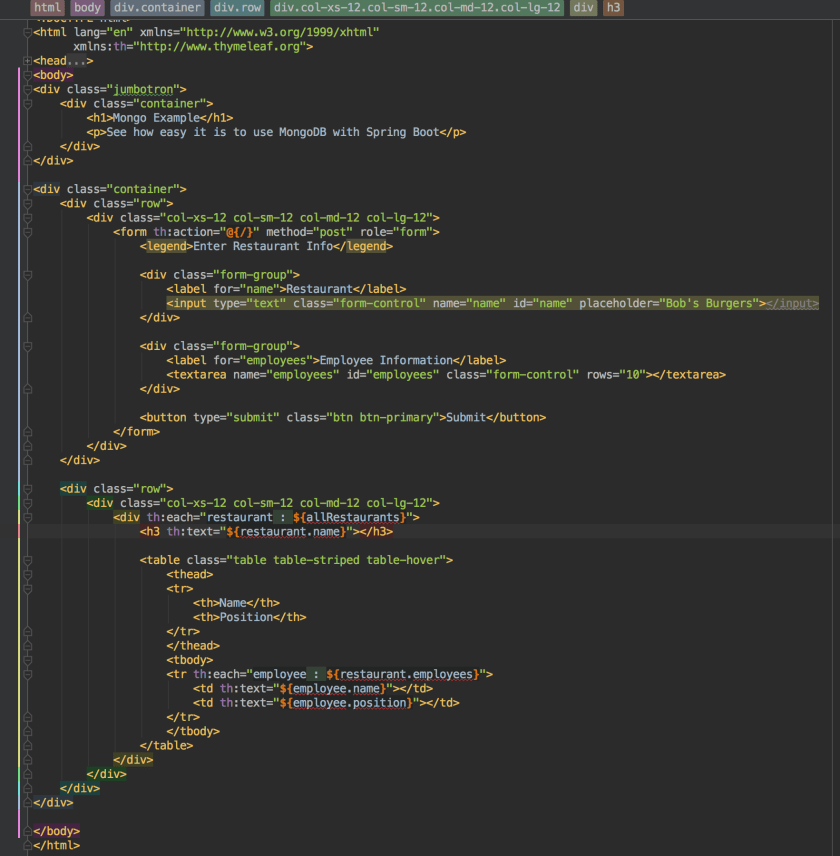
Now we just need an HTML template to provide us with front end code.
indexcode

Conclusion

Here is an example of the application when run.


As you can see, Spring Boot combined with Kotlin makes it really easy to persist data into MongoDB. We only need to define a few data classes and allow Spring to make our Repository classes for us in order to get started.

You can view the code for this project at my GitHub page at this link.

Spring Boot JPA Kotlin

Spring Boot provides a ready made solution to working with Java Persistence API (JPA). The post discusses how to make a basic web application that reads and writes employees to a database. We can also count how many employees have a certain name. This will all be done using Spring’s JPA features and the Kotlin programming language.

Spring Boot provides us with a data source on its own with very little configuration. Of course, we are free to connect the application to remote databases as well. To get started, we need to fill out some properties in the application.properties file found in src/main/resources

application.properties

spring.jpa.hibernate.ddl-auto=create-drop
spring.jpa.properties.hibernate.current_session_context_class=org.springframework.orm.hibernate5.SpringSessionContext
spring.datasource.driver-class-name=org.hsqldb.jdbcDriver

The first property, spring.jpa.hibernate.ddl-auto=create-drop tells the application to scan for all classes annotated with @Entity and create database tables for us. The persistence provider does the work of generating database definition language (DDL) and creating our database schema for us.

The second property configures Hibernate to act as our persistence provider. This is required because JPA is a specification. It requires a 3rd party library (Hibernate, EclipseLink, etc) to actually implement the specification. Finally, we need to tell the application what JDBC driver to use. This should match our database. In this case, we are using HSQLDB so we load their JDBC driver.

Database Entity

We need to create one or more persistant objects that are mapped to the database. In this case, we only have 1, an Employee Class, that we are using to map to a database table.

//This class maps to a table in the database
//that will get created for us
@Entity
data class Employee(
       @field: Id @field: GeneratedValue var Id : Long = 0, //Primary Key
       var name : String = "", //Column
       var position : String = "") //Column

Kotlin provides data classes for these sort of situations. The first property is annotated with Id and serves as the Primary Key. The GeneratedValue annotation tells the persistence provider to generate primary key values for us. The other two properties, name and position, end up becoming columns in the database table. When persistence provider scans this class, it will issue the correct commands to the database and generate an employee table with an primary key columna and two VARCHAR columns. Each instance of the Employee class that we store will become a record in the table.

Automatic Repositories

Spring is capable of generating @Repository classes for use when working with JPA. These repositories come fully loaded with 18 methods that handle all of our CRUD (create, read, update, and delete) methods and provide container managed transactions. We can even create our own custom queries using a naming convention and Spring will infer what needs to be done.

However, before we can have Spring generate our repositories for us, we need to tell it to do so. That’s pretty easy because all we need is a small configuration class.

Config

@Configuration
//The next line tells Spring Generate our JPA Repositories
@EnableJpaRepositories(basePackages = arrayOf("com.stonesoupprogramming.jpa"))
class Config

The package passed to the @EnableJpaReposities tells Spring where to look for repository interfaces. In order to make a Repository for the Employee class, we only need to declare an interface that extends JpaRepository.

EmployeeRepository

//The Implementation for this class is generated
//by Spring Data!
interface EmployeeRepository : JpaRepository <Employee, Long>{

    //Define a custom query using Spring Data
    fun countByNameContainingIgnoringCase(name : String) : Long
}

At no point will we ever write an implementation for this interface. When Spring sees this interface, it will generate an implementation class that is fully loaded and ready for our application to use. Technically, this interface could be empty, but we do have one method countByNameContainingIgnoringCase(String). Let’s discuss it.

Spring JPA Repositories are capable of defining queries on our persiteted objects provided that we follow the proper naming convention. Let’s take apart countByNameContainingIgnoringCase and discuss what each part means.

  • count — We are defining a count query
  • ByName — The syntax here is By[Property]. Our Employee class has a Name property, so we write ByName. If we wanted to use Position instead, it would be ByPosition
  • ContainingIgnoringCase — This is the predicate of the query. We are looking for anything containing a string value (in this case) and we are ignoring the case.

So in the end countByNameContainingIgnoringCase defines a query that means what it says. We are going to get a count of all records where the name contains a certain name and the name is not case sensitive. Spring is able to parse this name and create the correct query for us.

Put it in Action!

I wrote an MVC application that demonstrates how to use these concepts in a web application. Here is the code for the controller.

@Controller
@RequestMapping("/")
class IndexController(@Autowired private val employeeRepository: EmployeeRepository) {

    @RequestMapping(method = arrayOf(RequestMethod.GET))
    fun doGet(model : Model) : String {
        model.apply {
            addAttribute("employee", Employee())
            addAttribute("showName", false)
            addAttribute("employees", employeeRepository.findAll().toList())
        }
        return "index"
    }

    @RequestMapping("/employee_save", method = arrayOf(RequestMethod.POST))
    fun doEmployeeSave(employee: Employee,
                       model : Model) : String {
        employeeRepository.save(employee)
        model.apply {
            addAttribute("employee", Employee())
            addAttribute("showName", false)
            addAttribute("employees", employeeRepository.findAll().toList())
        }
        return "index"
    }

    @RequestMapping("/employee_count", method = arrayOf(RequestMethod.POST))
    fun doEmployeeCount(@RequestParam("name") name : String,
                        model : Model) : String {
        val count = employeeRepository.countByNameContainingIgnoringCase(name)
        model.apply {
            addAttribute("employee", Employee())
            addAttribute("showName", true)
            addAttribute("count", "Number of employees having name $name: $count")
            addAttribute("employees", employeeRepository.findAll().toList())
        }
        return "index"
    }
}

Even though we never wrote an implementation for EmployeeRepository, we can safely inject an instance of EmployeeRepository into our controller class. From this point, we have an HTTP GET method and two POST methods. The doEmployeeSave calls employeeRepository.save() and saves the incoming Employee object to the database. It also calls employeeRepository.findAll() and sends all employee records back to the view.

The doEmployeeCount calls our custom employeeRepository.countByNameContainingIgnoringCase method and returns a count of how many employee records contain the given name. We can pass this number back to the view. Once again, we are using employeeRepository.findAll().

This is the HTML code that works with the IndexController class.
indexhtml1indexcontroller2

Conclusion

The JPA cababilities provided by Spring Boot make developing ORM applications a breeze and it’s worth while to leverage them. For one thing, we only have to write a fraction of the code that we might have to write otherwise, but we are also less likely to introduce bugs into the application because we can trust the implementation of the JPA Repository classes and the persistence provided SQL generating capabilities.

Here are some screen shots of the finished application.


You can download the code at my GitHub page here or visit the YouTube tutorial.

Kotlin Stream Image from Database

Many web applications allow users to store images for later. For example, you may want to allow users to upload a profile picture that gets displayed later on in the application. This post demonstrates how to upload an image to a web application and store the image in a database. Then we will see how to display that image in a browser.

PersistedImage

The key to storing an image in a database is to use @Lob annotation in JPA and make the datatype as a byte array. Here is an example class that stores byte array in the database.

@Entity
data class PersistedImage(@field: Id @field: GeneratedValue var id : Long = 0,
                          //The bytes field needs to be marked as @Lob for Large Object Binary
                          @field: Lob var bytes : ByteArray? = null,
                          var mime : String = ""){

    fun toStreamingURI() : String {
        //We need to encode the byte array into a base64 String for the browser
        val base64 = DatatypeConverter.printBase64Binary(bytes)

        //Now just return a data string. The Browser will know what to do with it
        return "data:$mime;base64,$base64"
    }

Kotlin has a ByteArray class. In Java you would use byte []. The effect is the same either way. When persistence provider scans this class, it will store the byte array as a Lob in the database. Nevertheless it’s not enough to simply store an image in the database. At some point in time, the user will most likely wish to see the image. That’s there the toStreamingURI() method comes in handy.

The first line uses DatatypeConverter to convert the byte array to a base64 string. Then we can append that string to “data:[mime];base64,[base 64]”. In our example, we use Kotlin’s String template feature to build such a String. We start with the data: followed by the mime (such as /img/png). Then we can add the base64 string created by DatatypeConverter. This string can get added to the src attribute of the html img tag as shown in the screen shot below.

base64string
The browser knows how to display this string as an image.

File Uploads

It’s worth while to discuss how files are upload in Spring. Spring has a MultipartFile class that can get mapped to the a file upload input tag in the form. Here is how it looks in the HTML code.
fileuploadform
There are a couple of things that are critical for this to work. First, we have to set our applications.properties file to allow large file uploads.

spring.http.multipart.max-file-size=25MB
spring.http.multipart.max-request-size=25MB

Next our form tag has to set the enctype attribute to “multipart/form-data”. Finally we have to keep track of the name attribute on our input tag so that we can map it to the server code. In our example, our input tag has it’s name attribute set to “image”.

On the server end, we use this code get an instance of MultipartFile.

@RequestMapping(method = arrayOf(RequestMethod.POST))
    fun doPost(
            //Grab the uploaded image from the form
            @RequestPart("image") multiPartFile : MultipartFile,
               model : Model) : String {
        //Save the image file
        imageService.save(multiPartFile.toPersistedImage())
        model.addAttribute("images", imageService.loadAll())
        return "index"
    }

We annotate the multipartFile parameter with @RequestPart and pass to the annotation the same name attribute that we set on our input tag. At this point, the container will inject an instance of MultipartFile that represents the file that the user uploaded to the server. The MultipartFile class has two attributes that are critical to our purposes. First it has a byte array property that represents the bytes of the uploaded file and it has the file’s MIME.

We can use Kotlin’s extension functions to add a toPersistedImage() method on MutlipartFile.

fun MultipartFile.toPersistedImage() = PersistedImage(bytes = this.bytes, mime = this.contentType)

This method simply returns an instance of PersisitedImage that can get stored in the database. At this point, we can easily store and retrieve the image from the database.

Application

The demonstration application is a regular Spring MVC application written in Kotlin. You can refer to this post on an explanation on how this works. Here is the Kotlin code followed by the HTML code.

Kotlin Code

package com.stonesoupprogramming.streamimage

import org.hibernate.SessionFactory
import org.springframework.beans.factory.annotation.Autowired
import org.springframework.boot.SpringApplication
import org.springframework.boot.autoconfigure.SpringBootApplication
import org.springframework.context.annotation.Bean
import org.springframework.context.annotation.Configuration
import org.springframework.stereotype.Controller
import org.springframework.stereotype.Repository
import org.springframework.stereotype.Service
import org.springframework.ui.Model
import org.springframework.web.bind.annotation.RequestMapping
import org.springframework.web.bind.annotation.RequestMethod
import org.springframework.web.bind.annotation.RequestPart
import org.springframework.web.multipart.MultipartFile
import javax.persistence.*
import javax.transaction.Transactional
import javax.xml.bind.DatatypeConverter

@SpringBootApplication
class StreamImageDbApplication

fun main(args: Array) {
    SpringApplication.run(StreamImageDbApplication::class.java, *args)
}

@Entity
data class PersistedImage(@field: Id @field: GeneratedValue var id : Long = 0,
                          //The bytes field needs to be marked as @Lob for Large Object Binary
                          @field: Lob var bytes : ByteArray? = null,
                          var mime : String = ""){

    fun toStreamingURI() : String {
        //We need to encode the byte array into a base64 String for the browser
        val base64 = DatatypeConverter.printBase64Binary(bytes)

        //Now just return a data string. The Browser will know what to do with it
        return "data:$mime;base64,$base64"
    }
}

//This is a Kotlin extension function that turns a MultipartFile into a PersistedImage
fun MultipartFile.toPersistedImage() = PersistedImage(bytes = this.bytes, mime = this.contentType)

@Configuration
class DataConfig {

    @Bean
    fun sessionFactory(@Autowired entityManagerFactory: EntityManagerFactory) :
             SessionFactory = entityManagerFactory.unwrap(SessionFactory::class.java)
}

@Repository
class ImageRepository(@Autowired private val sessionFactory: SessionFactory){

    fun save(persistedImage: PersistedImage) {
        sessionFactory.currentSession.saveOrUpdate(persistedImage)
    }

    fun loadAll() = sessionFactory.currentSession.createCriteria(PersistedImage::class.java).list() as List
}

@Transactional
@Service
class ImageService(@Autowired private val imageRepository: ImageRepository){

    fun save(persistedImage: PersistedImage) {
        imageRepository.save(persistedImage)
    }

    fun loadAll() = imageRepository.loadAll()
}

@Controller
@RequestMapping("/")
class IndexController(@Autowired private val imageService: ImageService){

    @RequestMapping(method = arrayOf(RequestMethod.GET))
    fun doGet(model : Model) : String {
        model.addAttribute("images", imageService.loadAll())
        return "index"
    }

    @RequestMapping(method = arrayOf(RequestMethod.POST))
    fun doPost(
            //Grab the uploaded image from the form
            @RequestPart("image") multiPartFile : MultipartFile,
               model : Model) : String {
        //Save the image file
        imageService.save(multiPartFile.toPersistedImage())
        model.addAttribute("images", imageService.loadAll())
        return "index"
    }
}

application.properties

spring.jpa.hibernate.ddl-auto=create-drop
spring.jpa.properties.hibernate.current_session_context_class=org.springframework.orm.hibernate5.SpringSessionContext
spring.datasource.driver-class-name=org.hsqldb.jdbcDriver

spring.http.multipart.max-file-size=25MB
spring.http.multipart.max-request-size=25MB

index.html

streamimage

Conclusion

Spring and Kotlin make it easy to embed images in a database and display those images in a browser. The main take away is to define a byte array property as a Lob on persisted image and then convert it to a base64 String when you wish to display it. Here are some screen shots of the working application.


You can get the source code for this project at my GitHub here or watch the video tutorial on YouTube.