Kotlin Koans—Part 6

Insert Values into String

Kotlin upgrades some of Java’s String capabilities. One of the first things I liked was the ability to insert variables into the String

val a = 1
val b = 2
str = "Here is a String with values a=$a and b=$b)

We could of course have done this with String.format in Java

int a = 1;
int b = 2;
String str = "Here is a String with values a=%d and b=%d".format(a, b);

I think most people agree that the Kotlin approach is more concise.

Multiline Strings

Kotlin supports the “”” for mutliline strings without any need to escape charaters.

str = """
Here is a multiline String
C:\folder\file.txt

"""

The Kotlin Koans tutorial suggested that this was also useful for Regex expressions.

Task

The task for this portion of the tutorial was simple enough. We have a variable named month that we insert into a regex expression.

val month = "(JAN|FEB|MAR|APR|MAY|JUN|JUL|AUG|SEP|OCT|NOV|DEC)"

fun task5(): String{
    return """\d{2}\ $month \d{4}"""
}

This a use case for the triple quote Strings. In Java, we would have needed to escape all of the backslashes in the regex expression. I know that I am not the first developer who has gotten burned by typing \ when I should have typed \\, so the triple quote String is a nice feature.

You can click here to see Part 5.

Kotlin Koans—Part 5

Many modern programming lanugages have support for functional programming. I remember when Java got support for functional programming in JDK8. I have to say it was awesome to finally get support for functional programming.

Of course, Java has supported functional programming to a certain degree for a while now through anonymous inner classes. The syntax was verbose…

public class Window extends JFrame {
    
    public Window(){
        JButton jButton = new JButton("Button");
        jButton.addActionListener(new ActionListener() {
            @Override
            public void actionPerformed(ActionEvent e) {
                System.out.println("Clicked");
            }
        });
    }
}

Java 8 simplified this mess when it officially supported functional programming.

public class Window extends JFrame {

    public Window(){
        JButton jButton = new JButton("Button");
        jButton.addActionListener(e -> System.out.println("Clicked"));
    }
}

Readers can see that the above code is far more consise than the previous example so many Java developers, including myself, were greatful for the change. Android developers weren’t so lucky and unless things have changes, Android developers still have to live with anonymous inner class syntax.

That is until Kotlin came along and is now supported for Android. In this portion of the Kotlin Koans tutorial, I had to rewrite this Java code into Kotlin.

public class JavaCode4 extends JavaCode {
    public boolean task4(Collection collection) {
        return Iterables.any(collection, new Predicate() {
            @Override
            public boolean apply(Integer element) {
                return element % 42 == 0;
            }
        });
    }
}

Of course, JDK 8 developers get the Stream API and lambda syntax, while Android developers were out of luck. Here is the equivalent Kotlin code.

fun task4(collection: Collection): Boolean{
    return collection.any { element -> element % 42 == 0 }
}

You can click here to see Part 4

Kotlin Koans—Part 4

Kotlin does indeed use default arguments and named parameters. This was something I really enjoy in Python but isn’t supported in Java.

For those people who aren’t familiar with the term, named arguments is a feature in a programming language where a developer can specify the name of a parameter and assign it a value when calling a function. It helps improve code readability. Here is a little Python to show off named arguments.

def func(arg1, arg2, arg3):
    pass

# Which is more clear?
# Named arguments?
func(arg1=1, arg2=2, arg3=3)

# Non-named arguments?
func(1, 2, 3)

In the above code snippet, the developer calls each argument in the function by it’s name and assigns a value to the parameter. It’s a lot nicer because you can instantly see what each value in the function is doing.

Many people have probably heard of default arugments. This is a feature in many programming languages where a developer can specify a default value for a parameter. When calling the function, the client code can choose to specify a value or just use the default. Here is another little Python teaser.

def func(arg1='Hello World'):
    pass

# Using default
func()

# Using custom value
func('Thunderbiscuit')


Java does not support either of these concepts. It does support function overloading. In this portion of Kotlin Kroans, we have to translate this Java code into Kotlin.

package i_introduction._3_Default_Arguments;

import util.JavaCode;

public class JavaCode3 extends JavaCode {
    private int defaultNumber = 42;

    public String foo(String name, int number, boolean toUpperCase) {
        return (toUpperCase ? name.toUpperCase() : name) + number;
    }

    public String foo(String name, int number) {
        return foo(name, number, false);
    }

    public String foo(String name, boolean toUpperCase) {
        return foo(name, defaultNumber, toUpperCase);
    }

    public String foo(String name) {
        return foo(name, defaultNumber);
    }
}

Readers will notice that the function foo is overloaded three times with different versions specify default arguments. It works, but it's also super verbose. Kotlin cuts through all of that noise. Here is the same code in Kotlin.

fun foo(name: String, number: Int = 42, toUpperCase: Boolean=false): String {
    if (toUpperCase) {
        return name.toUpperCase() + number
    } else {
        return name + number
    }
}

Readers will see that Kotlin is much more consice. One Kotlin function can do the same job as four functions in Java. We can call this function using this code.

fun task3(): String {
    return (foo("a") +
            foo("b", number = 1) +
            foo("c", toUpperCase = true) +
            foo(name = "d", number = 2, toUpperCase = true))
}

In this code snippet, we make four distinct calls to foo. Each time, we only specify the arguments that we need. I am also a huge fan of using the named arguments also. It makes it much easier to read the code.

You can click here to see Part 3 or Part 5

Kotlin Spring MVC

Kotlin makes Spring MVC projects a total breeze. This is a simple web application that combines a few different Kotlin techniques into a Spring Boot project. Here are few screen shots of the finished example and then we will dive into the code that makes it possible.


package com.stonesoupprogramming.kotlinspringmvc

import org.springframework.boot.SpringApplication
import org.springframework.boot.autoconfigure.SpringBootApplication
import org.springframework.stereotype.Controller
import org.springframework.ui.Model
import org.springframework.web.bind.annotation.RequestMapping
import org.springframework.web.bind.annotation.RequestMethod

@SpringBootApplication //This performs magic under the hood to launch a spring web application
class KotlinSpringMvcHelloWorldApplication

//Entry point to the application
fun main(args: Array) {
    SpringApplication.run(KotlinSpringMvcHelloWorldApplication::class.java, *args)
}

//This is a class that we are using for our form
//Kotlin let's us one line it!
data class Registration(var firstName: String = "", var lastName: String = "")

@Controller //Tells Spring this is a controller class
@RequestMapping("/") //Tells Spring to handle web requests at the root
class Controller {

    //This function will handle HTTP Get Requests
    @RequestMapping(method = arrayOf(RequestMethod.GET))
    fun doIndexGet(model: Model): String{
        //Send a new instance of Registration back to the view
        model.addAttribute("registration", Registration())

        //Render the index.html page
        return "index"
    }

    //This method handles HTTP Post
    @RequestMapping(method = arrayOf(RequestMethod.POST))
    fun doIndexPost(formParams: Registration, model: Model): String {
        //Send a greeting message to the view
        model.addAttribute("greet", "Hello ${formParams.firstName} ${formParams.lastName}")

        //Render the greet.html page
        return "greet"
    }

    //This handles GET requests for /greet.html
    @RequestMapping(path = arrayOf("/greet"), method=arrayOf(RequestMethod.GET))
    fun doGreetGet(): String = "greet" //Just tell it to render the greet.html page
}

Initializing the Application

Many readers are no doubt familiar with Spring Boot. Our first class in this project appears on line 11 with this code.

@SpringBootApplication //This performs magic under the hood to launch a spring web application
class KotlinSpringMvcHelloWorldApplication

Kotlin focuses on begin concise and in this is literally an empty class that is annotated with @SpringBootApplication. The annotation performs some Spring magic that does the job of initializing the Spring environment for us. Our next segment of code is the entry point to the application.

//Entry point to the application
fun main(args: Array) {
    SpringApplication.run(KotlinSpringMvcHelloWorldApplication::class.java, *args)
}

Once again, there isn’t much code here, but a lot is happening under the hood that is invisible to us. We are calling the static SpringApplication.run function and passing into it the KotlinSpringMvcHelloWorldApplication class along with the supplied command line arguments. Once again, we will leave it up to Spring to prepare our environment.

Data Class

Many Java developers have no doubt made classes the are simply holders for properties along with a constructor, getters and setters, hashcode(), equals(), and toString(). Two common applications of such classes are ORM model classes and classes that can be passed back to the view. In this case we are making a class that gets passed to the view, but we are going to define it using Kotlin’s data class. The code for such a class is extremely brief.

data class Registration(var firstName: String = "", var lastName: String = "")

Using this single line of code, we make a Registration class with two properties, a default constructor, and an overloaded constructor. The class comes packed with hashcode(), equals(), toString() and when used in Java code, it will have getters and setters. We are going to pass this code back to the view in the controller class.

Controller

The Controller is another portion of Spring MVC. We use it to map HTTP requests to the appropriate methods in the class. Spring will also inject a Model class when needed so that we can pass data back to the view. Here is the controller class written in Kotlin.

@Controller //Tells Spring this is a controller class
@RequestMapping("/") //Tells Spring to handle web requests at the root
class Controller {

    //This function will handle HTTP Get Requests
    @RequestMapping(method = arrayOf(RequestMethod.GET))
    fun doIndexGet(model: Model): String{
        //Send a new instance of Registration back to the view
        model.addAttribute("registration", Registration())

        //Render the index.html page
        return "index"
    }

    //This method handles HTTP Post
    @RequestMapping(method = arrayOf(RequestMethod.POST))
    fun doIndexPost(formParams: Registration, model: Model): String {
        //Send a greeting message to the view
        model.addAttribute("greet", "Hello ${formParams.firstName} ${formParams.lastName}")

        //Render the greet.html page
        return "greet"
    }

    //This handles GET requests for /greet.html
    @RequestMapping(path = arrayOf("/greet"), method=arrayOf(RequestMethod.GET))
    fun doGreetGet(): String = "greet" //Just tell it to render the greet.html page
}

The first line is the @Controller annotation. Our Spring boot environment has component scanning enabled, so we only need to annotate our controller class to make Spring aware of it’s existence. On line 2, we have the @RequestMapping annotation that tells Spring that the default request mapping for this class is the root of the web application (‘/’). The class contains three functions: doIndexGet, doIndexPost, and doGreetGet. Let’s talk about each in detail.

doIndexGet

This method is annotated with @RequestMapping and it handles HTTP Get requests to the ‘/’ endpoint. The function has one parameter, model : Model, and it returns a String. The model parameter is injected by Spring.

On the first line of the function, we add a “registration” attribute to the model with a new instance of Registration. Notice that in Kotlin, we do not need the new keyword and since we define default arguments for our Regsitration class, we do not need to supply an parameters. The function ends by returning the String “index” which will tell Spring and Thymeleaf (which is our template engine) which page to render.

doIndexPost

This function handles HTTP post methods as indicated by @RequestMapping(method = arrayOf(RequestMethod.POST)). It’s two arguments, formParams: Registration, and model : Model, are injected into this method by Spring. In the view, we have the following http form.
form copy
Inside of this html code you will see things like ${registration}, th:field=”*{firstName}”, and th:field=”*{lastName}”. These special tags map these input fields to the properties our Registration object that we sent back to the view in the doIndexGet function. When we click on the submit button the setter methods of the registration object are called and the values of the input boxes in the form are inserted into Registration::firstName and Registration::lastName. Then the Registration object is sent back to the server and routed to our doIndexPost method.

Once we are inside of the doIndexPost method, we can add a String to our model class.

model.addAttribute("greet", "Hello ${formParams.firstName} ${formParams.lastName}")

The second argument is the portion that I wish to discuss. Kotlin has String templating which lets us build a String using inline variables. Thus the ${formParams.firstName} will get replaced with the first name entered by the user and ${formParams.lastName} gets replaced with the last name the user entered. Then the function returns with the String “greet” which tells the web application to show the greet page.

doGreetGet

This final function is the shortest. It’s simply a function that handles the request mapping for HTTP Get when the browser navigates to the greet page. However, Kotlin let’s us define functions inline, so it’s worth talking about.

@RequestMapping(path = arrayOf("/greet"), method=arrayOf(RequestMethod.GET))
fun doGreetGet(): String = "greet" //Just tell it to render the greet.html page

All this code does is return the string “greet” so that the web application knows to render the greet.html page. Since it’s literally just returning one value, we can legally write String = “greet” in Kotlin and omit the method body.

Web Pages

For reference purposes, I have included screen shots of the web pages (they don’t seem to render properly when I use the code formatter 😦 sorry readers)!

index.html
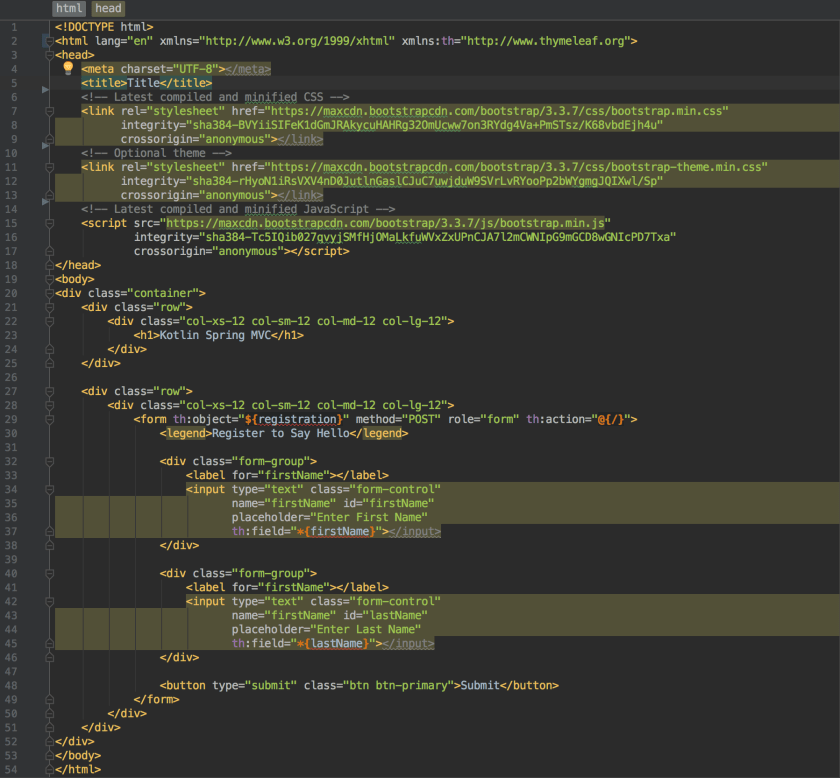
index copy
We have already discussed how the Registration object is bound to the html form on this page. However, it’s worth pointing out that this page uses Bootstrap for page layout. Most of the code in this page was auto-generated by Intellij also, which has world class support for Bootstrap.

greeting.html
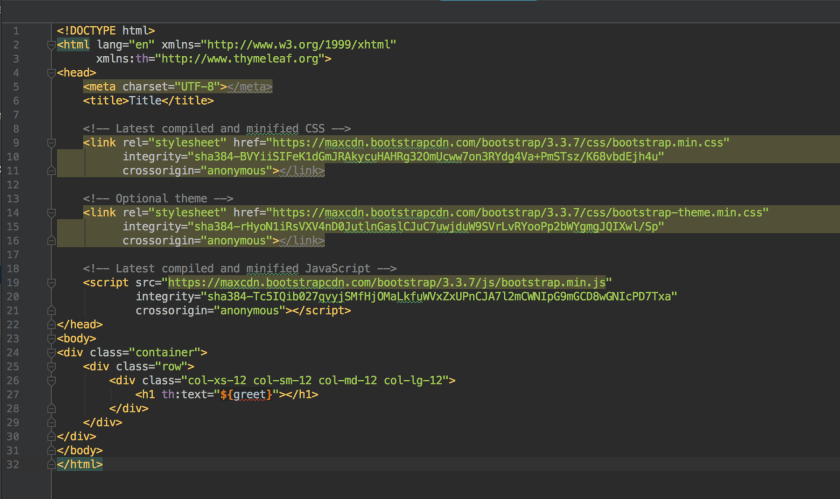
greet_page copy
This is the other page that get’s returned by the controller after the user enters their name. We built a String in doPostIndex and mapped it to the key “greet” in the model. On this page, we can show that custom greeting by using th:text=”${greet}”. The template engine is smart enough to insert this greeting between the header tags.

Source

You can get the complete source code for this project from my Bitbucket page. Happy coding!

Kotlin Koans—Part 2

After doing the first tutorial on Kotlin, I was impressed, but let’s face it, anyone can do a simple “hello world” style program. Nevertheless, I decided to continue with the Kotlin tutorial found at kotlinlang.org. When I moved onto part two of the tutorial, I was really impressed.

It wasn’t that I was super impressed with the language itself. It was IntelliJ’s support of Kotlin that blew me away. When you copy and paste Java code into the IDE, it will offer to translate it to Kotlin for you.

You can see in the video that IntelliJ just did the work of taking the Java code that I copied and pasted into my Kotlin class. I thought this was incredibly slick because it gave me the change to see the differences between Java and Kotlin.

Of course, I wanted to do the exercise myself so that I can get the hang of writing Kotlin code. The problem in this portion of the tutorial was to take this Java code and rewrite as Kotlin code.

public class JavaCode1 extends JavaCode {
    public String task1(Collection collection) {
        StringBuilder sb = new StringBuilder();
        sb.append("{");
        Iterator iterator = collection.iterator();
        while (iterator.hasNext()) {
            Integer element = iterator.next();
            sb.append(element);
            if (iterator.hasNext()) {
                sb.append(", ");
            }
        }
        sb.append("}");
        return sb.toString();
    }
}

It’s not too painful of code. Here is what I ended with when I wrote the code as Kotlin code on my own.

fun todoTask1(collection: Collection): Nothing = TODO(
    """
        Task 1.
        Rewrite JavaCode1.task1 in Kotlin.
        In IntelliJ IDEA, you can just copy-paste the code and agree to automatically convert it to Kotlin,
        but only for this task!
    """,
    references = { JavaCode1().task1(collection) })


fun task1(collection: Collection): String {
    val sb = StringBuilder()
    sb.append("{")
    val iterator = collection.iterator()
    while (iterator.hasNext()){
        val element = iterator.next()
        sb.append(element)
        if (iterator.hasNext()){
            sb.append(", ")
        }
    }
    sb.append("}")
    return sb.toString()
}

There was one thing I noticed about the Kotlin code that I liked. It looks as if we are allowed to have free standing functions in Kotlin outside of a class definition. While I appreciate OOP, there are frankly times where I’m not sure if OOP is the best approach to a problem. This was one of things I really like about Python is that I can break out of OOP when I want.

Now I know that it’s perfectly true that we can use static imports in Java, but I have always felt that was a clumsy approach. Static functions and static imports always seemed more like an after thought to the language that got tacked on after enough people complained. Of course, that’s just a matter of opinion, but anyway, I do like having a choice in Kotlin about when to use classes or just when to use function. Kotlin seems to have included this choice as part of the design of the language right from the get go.

You can click here to see Part 1 and here to see Part 3.

Functions—Python

All computer programming languages allow developers to seperate code into reuseable pieces of code called functions. Functions are critical because they allow us to generalize pieces of work into a block of code and reuse that code as many times as needed. When designed well, functions improve code readability by cutting down on the length of the code. We can also debug our code easier because we only have to look in on place for a bug rather than several places.

Demonstration

Let’s begin with a function demonstration.

# A function
def nested_func():
    print('Inside of nested_func()')
    return 'value'


# A function
def func():
    print('Inside of func()')

    val = nested_func()
    print('Back in func(). nest_func() returned {}'.format(val))


# Not a function
if __name__ == '__main__':
    print('Outside of all functions. Calling func()')
    func()
    print('Back from our functions')

This is a block of code that creates two functions. When we run the code, we get this output.

Outside of all functions. Calling func()
Inside of func()
Inside of nested_func()
Back in func(). nest_func() returned value
Back from our functions

Computer programs normally run from top to bottom one line at a time. In the case of this program, the program doesn’t start until we reach if __name__ == '__main__':. This is because Python runtime isn’t going to execute the code inside of nest_func() or func() until the functions are called.

When the code reaches 17, it executes the print statement. The next line, 18, is our first call to a function. We named our function func() in this case. Calling func() causes the program’s execution to jump up to line 9. Once we are at line 9, Python executes the print statement and then moves onto the next line in the function, line 11.

Line 11 creates a variable called val and then calls our next function, nested_func(). The nested_func() function is a function that returns a value. Program execution moves to line 3. Line 3 executes the print statement, and then line 4 returns a String value. The program execution returns back to line 11.

At this point, the variable val has a value stored in it. The program’s execution goes to line 12 and the print statement is executed. Now the program exits the func() function and control returns to line 19. The program executes the final print statement found on line 19 and then exits.

Defining a function

You create functions in Python by using the def keyword followed by the name of the function. After the name of the function, you have an opening parentheses ( followed by a closing parenthese ). You can place any number of variables inside of the parentheses. Here is an example

# Function with arguments
def func(val, val2):
    print(val)
    print(val2)

# Calling the function
func('Hello', 'World')

The name of this function is func. It has two arguments, val and val2. After the colon, you can include any number of statements you would like inside of the function. The function is now a seperate unit of code at this point. This function get’s called by func('Hello', 'World'). Anytime the Python interpreter something like this, it will execute all of the statements inside of func. We do not have to use ‘Hello’ or ‘World’ as the argument either. It’s perfectly ok to do something like func(47, 'Thunderbiscuit').

Optional Arguments

We can specify default values to our functions.

def some_func(arg1='Mickey'):
    print(arg1)

# Prints 'Mouse'
some_func('Mouse')

# Prints 'Mickey'
some_func()

Since this function has optional arguments, we can either pass it our own argument, or we can just use the default. The first call passes ‘Mouse’ to some_func, in which case arg1 = ‘Mouse’. The second call does not specify a value, so arg1 gets the default ‘Mickey’ value.

Lists—Python

Lists are a sequence type object that Python provides to us for grouping data together into a single variable. Let’s consider a common application of a list before we go into details.

names = ['Bob Belcher',
         'Linda Belcher',
         'Tina Belcher',
         'Gene Belcher',
         'Louise Belcher']
for name in names:
    print (name)

This code creates a list called names and populates it with five names. Then it prints the names to the console. We could accomplish the same output by using this code.

bob = 'Bob Belcher'
linda = 'Linda Belcher'
tina = 'Tina Belcher'
gene = 'Gene Belcher'
louise = 'Louise Belcher'

print(bob)
print(linda)
print(tina)
print(gene)
print(louise)

A quick comparison shows that the first example is not only much easier to read, but it is also more maintainable. If we want to print additional names, we only need to add them to the names list in the first example. However, in the second example, we need to add new name variable and another print statement. This may not seem like a big deal with six names, but obviously 6,000 is a much different case.

It’s for this reason that almost every programming language provides some sort of a collection object. List is one such data type that Python provides out of the box. Let’s look at common list operations.

Check if item is in the list

We may want to check if a list has a certain item.

names = ['Bob Belcher',
         'Linda Belcher',
         'Tina Belcher',
         'Gene Belcher',
         'Louise Belcher']
if 'Bob Belcher' in names:
    print('Found Bob')

This code prints ‘Found Bob’ because 'Bob Belcher' in names returns True.

Check if item is not in list

We can also check if a list does not have an item.

names = ['Bob Belcher',
         'Linda Belcher',
         'Tina Belcher',
         'Gene Belcher',
         'Louise Belcher']
if 'Teddy' not in names:
    print('No Teddy here!')

This code would print ‘No Teddy here!’ because 'Teddy' not in names is True. Our names list does not have ‘Teddy’

Combine lists

We can add two lists together (called concatenation) using the + operator.

belchers = ['Bob Belcher',
            'Linda Belcher',
            'Tina Belcher',
            'Gene Belcher',
            'Louise Belcher']

pestos = ['Jimmy Pesto',
          'Jimmy Pesto Jr.',
          'Andy Pesto',
          'Ollie Pesto']

family_frackus = belchers + pestos
print(family_frackus)

This code will print all of the names to standard out when run.

Accessing items

Lists use the index operator access items

belchers = ['Bob Belcher',
            'Linda Belcher',
            'Tina Belcher',
            'Gene Belcher',
            'Louise Belcher']
print(belchers[0])
print(belchers[3])

Keep in mind that lists are 0 based, so belchers[0] is ‘Bob Belcher’ while belchers[3] is ‘Gene Belcher’

Add item to list

We can add an item to a list using the append() method.

belchers = ['Bob Belcher',
            'Linda Belcher',
            'Tina Belcher',
            'Gene Belcher',
            'Louise Belcher']
belchers.append('Teddy')
print(belchers[5])

Remove item from a list

We use the del operator to remove an item from a list

belchers = ['Bob Belcher',
            'Linda Belcher',
            'Tina Belcher',
            'Gene Belcher',
            'Louise Belcher']
del belchers[0]

Using del belchers[0] removes ‘Bob Belcher’ from the list.

Replace item in a list

We can replace an item in a list by specifying the index and assigning a new value to it.

belchers = ['Bob Belcher',
            'Linda Belcher',
            'Tina Belcher',
            'Gene Belcher',
            'Louise Belcher']
belchers[0] = 'Mort'

The code belchers[0] = 'Mort' replaces ‘Bob Belcher’ with ‘Mort’

Length of the list

We get the length of the list using len.

belchers = ['Bob Belcher',
            'Linda Belcher',
            'Tina Belcher',
            'Gene Belcher',
            'Louise Belcher']
print(str(len(belchers))) 

The print(str(len(belchers))) prints 5 to the console.

Conclusion

We can do a lot more with lists than what was discussed in this post. Make sure you check out the Python documentation for a complete list of features!

Strings—Python

Python has native support for Strings (which is basically text). Many computer programs need to process text data and Python’s string type has powerful features to make the lives of developers easy!

String Literals

Here are a few examples of how to create strings in Python using literals.

sq = 'String made with Single Quotes'
dq = "String made with double quotes"
tq = """String with triple quotes"""

Double quote strings let you embed an apostrope character without escaping it. So you can write “I’m a cat” as a string literal in Python. Triple quote strings allow white space and line breaks in the string.

Individual Characters

Python strings support the index operator, so you can access characters in a string using [n] where n is the position of the character you wish to access. Here are a few ways to process strings by individual characters.

kitties = 'I like kitties'

# Access by index
for i in range(0, len(kitties)):
    print(kitties[i])

# Access with iteration
for c in kitties:
    print (c)

Useful Methods

The Python string class has many useful methods. You can view them all at Python documentation. Here are some of the ones I use the most.

islower()

This checks if a string is all lower case characters.

kitties = 'i like kitties'
if kitties.islower():
    print(kitties, ' is lower case')
else:
    print(kitties, ' is not lower case')

lower()

Python Strings are immutable, but you can use lower to convert a string to all lower case.

kitties = 'I like kitties'

if not kitties.islower():
    kittens = kitties.lower()
    print(kittens) 

isupper()

This method tests if a string is all upper case.

kitties = 'I LIKE KITTIES'

if kitties.isupper():
    print(kitties, ' is upper case')
else:
    print(kitties, ' is not upper case')

upper()

This method converts the string to upper case.

kitties = 'i like kitties'

if not kitties.isupper():
    cat = kitties.upper()
    print(cat)

isnumeric()

Checks if the strings is a numbers. This is useful if you want to convert a string to an int.

number_str = '3'

if number_str.isnumeric():
    number = int(number_str)

format()

This is useful for using a generic string that allows you to replace {} with values.

fm = 'I have {} kitties'
print(fm.format(3')
# Prints: I have 3 kitties

Numbers—Python

Computer programs need to track numberic data every single day. You may want to track balances in bank accounts, scientific numbers, or just counters. Python gives us a wide variety of numeric processing types. Here are some of the more common ones:

  • Integers
  • Floats
  • Boolean
  • Decimals
  • Fractions

Integers

Integers are whole numbers that are either positive or negatives. Unlike langues such as Java or C++ (or Python 2.x) Python does not distinguish between regular and long integers. Here are some examples of declaring integers

positiveNumber = 123456
negativeNumber = -111

Floating Point Numbers

Floating point numbers are numbers that have decimal points or numbers in scientific notations. They can be positive or negative.

dollar = 3.15
pi = 3.14159
sci = 8.2e10

Octal, hex, binary

Here are examples of numbers in octal, hexadecimal, and binary numbers.

oct = 0o237
hex = Ox9F
binary = Ob10011111

Decimals and Fractions

Python provides us with Decimal and Fraction data types which maintainer percision with decimal points. A loss of percision may not get noticed in trival programs, but when working with big datasets, the loss of percision can introduce major bugs in the program.

d = Decimal('1.59')
f = Fraction(1, 3) # Numerator / denominator

Boolean

Booleans hold true and false values.

b = True
f = False

For more information

You can learn more by visiting the python documentation.

Python Unit Testing

Unit testing is a critical portion of any significant software project. Althougth adding unit tests increases the size of your project’s code base, well written unit tests let us maintain confidence in our code base.

Well designed code should work well as stand alone or mostly stand alone software components. This is true of both procedural code and OOP. Unit tests test these components to make sure they continue to work as expected. It helps development because if a software components breaks an expected interface or starts behaving in an expected fashion, we will know about the issue prior to building or deploying our application.

Many developers (including myself) prefer to know about bugs before users see them. Writing good units are one of many tools that help us catch bugs before they make it out into production code. This post will walk us through Python’s unit testing framework.

Example Test Class and Unit Test

Let’s start by creating a class that we are going to unit test. We are going to make a Greeter class that takes a Gender enumeration and a Greeter class.

from enum import Enum


class Gender(Enum):
    MALE = "m"
    FEMALE = "f"


class Greeter:
    def __init__(self, name, gender):
        self.name = name
        self.gender = gender

    def greet(self):
        if self.gender == Gender.MALE:
            return 'Hello Mr. {}'.format(self.name)
        elif self.gender == Gender.FEMALE:
            return 'Hello Ms. {}'.format(self.name)

What we are expecting the Greeter.greet method to do is print a greeting that contains either Mr or Ms depending on the gender. Let’s make a test that makes sure we are getting the correct output.

import unittest


class TestGreeter(unittest.TestCase):
    def test_greet(self):
        # Create a Greeter Object to test
        greeter_male = Greeter('Jonny', Gender.MALE)

        # Now check it is working properly
        self.assertTrue('Mr' in greeter_male.greet(), 'Expected Mr')

        # Now check female
        greeter_female = Greeter('Jane', Gender.FEMALE)
        self.assertTrue('Ms.' in greeter_female.greet(), 'Expected Ms')

if __name__ == '__main__':
    # This invokes all unit tests
    unittest.main()

We get the following output in the console. It’s pretty boring.

Ran 1 test in 0.002s

OK

Catching Bugs

Our first test is what we see if we have a working class and unit test. It’s very boring and we want boring. In many software projects, we tend to change things as we add new features, fix bugs, or improve code. If our changes break things in our code base, we want our unit tests to tell us about the issue.

Let’s make a small change in our Greeter class

class Greeter:
    def __init__(self, name, gender):
        self.name = name
        self.gender = gender

    def greet(self):
        if self.gender == Gender.MALE:
            return 'Hello Mr. {}'.format(self.name)
        elif self.gender == Gender.FEMALE:
            # Changed Ms. to Mrs.
            return 'Hello Mrs. {}'.format(self.name)

Now let’s run our test and see what happens

Failure
Traceback (most recent call last):
  File "/usr/local/Cellar/python3/3.6.1/Frameworks/Python.framework/Versions/3.6/lib/python3.6/unittest/case.py", line 59, in testPartExecutor
    yield
  File "/usr/local/Cellar/python3/3.6.1/Frameworks/Python.framework/Versions/3.6/lib/python3.6/unittest/case.py", line 601, in run
    testMethod()
  File "/Users/stonesoup/PycharmProjects/stonesoupprogramming/unit_test_demo.py", line 35, in test_greet
    self.assertTrue('Ms.' in greeter_female.greet(), 'Expected Ms')
  File "/usr/local/Cellar/python3/3.6.1/Frameworks/Python.framework/Versions/3.6/lib/python3.6/unittest/case.py", line 678, in assertTrue
    raise self.failureException(msg)
AssertionError: False is not true : Expected Ms


Ran 1 test in 0.013s

FAILED (failures=1)

If you are looking closely, we changed Ms. to Mrs. in our greeting. Given how small the change, it’s really easy for our human eyes to overlook the change and anyone can image how easy it would be for this bug to make it into production. Since our unit test is well written, we know about this bug right away!

If we did want our message to print Mrs rather than Ms, we need to update our unit test. That’s a good thing because it makes us think about how changes to our code impact the code base in general. Unit tests are so helpful that many developers have even adopted to “Test Driven Development” programming discipline.

You can learn more about Python’s unit testing framework at here.